"Our senior waitress left last month. She was the only one who knew the opening checklist, how we handle dietary requests at table, and how we run the Saturday service. We are still recovering."
"Every manager runs our outlet slightly differently. Monday shifts run one way, Friday shifts run another. Customer experience is inconsistent and we get complaints that we cannot trace to any specific cause."
"We open six days a week and every Friday I need to be there because if I am not, things get missed. I cannot take a weekend without something going wrong."
Without digital checklists, high-stakes tasks are skipped during busy periods -- and you find out too late
Kitchen operations that rely on verbal relay between service and kitchen create errors and delays at peak
New staff require 4-8 weeks to reach full productivity without standardised onboarding
Inconsistent service across shifts means your best shift review and your worst are from the same business
Owner absence during peak periods reveals every operational gap that the owner normally fills personally
regardless of which manager is on duty
verbal relay and handwritten tickets are eliminated
because the system flags exceptions, not routine tasks
Primary keyword: restaurant operations management software Singapore
Persona: Singapore restaurant, salon, or clinic owner whose operations depend on specific people knowing how things work -- so every departure, hire, or absence disrupts service consistency, and busy periods reveal which SOPs exist only in staff memory rather than in any system
Build your opening, mid-service, and closing checklists in OrderZ and assign them to shift managers by role. Each checklist item requires a sign-off before the shift advances. Incomplete checklists are flagged in your OrderZ dashboard -- visible to you from anywhere without calling the outlet. Food safety, prep, cleaning, and equipment checks are documented and timestamped for every shift, every day.
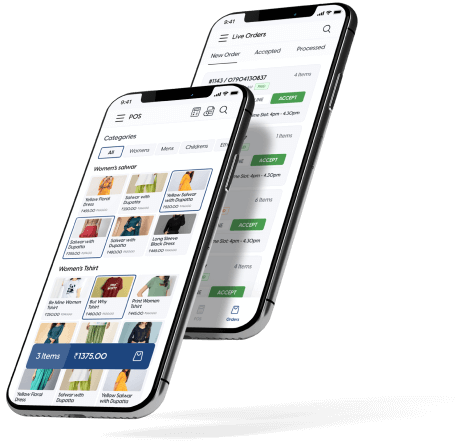
Every order placed on OrderZ POS appears on the kitchen display in real time, in ticket priority, with all modifications and dietary notes. Course sequence is managed from the display. Ticket timers flag orders that exceed your target kitchen time. The kitchen team works from one clear display -- not from handwritten dockets, a printer queue, or verbal instructions that become unreliable under pressure.
OrderZ routes the customer journey from order to kitchen to bill in one connected workflow. Floor staff place orders on OrderZ POS. Kitchen receives them on the display. Completed items are fired back to the service screen. The bill is generated from the same order -- no manual re-entry, no discrepancy between what was ordered and what was charged.
OrderZ manages the appointment journey end to end. Client books online or by phone. Reminder goes out automatically. Therapist is notified of the next appointment and client history before the session starts. Treatment is logged against the client record. Payment closes the session and updates the CRM. The entire workflow runs without manual tracking, paper records, or manual staff coordination at any stage.
Assign tasks to specific staff members or roles within OrderZ. Each task has a completion status visible in real time from your dashboard. Overdue tasks are flagged automatically. You can see which tasks have been completed and which remain outstanding for any current shift without calling the outlet. Task history is recorded per staff member -- providing a record for performance reviews and coaching conversations.
OrderZ embeds your SOPs as steps within each workflow -- not as a separate document that staff are expected to memorise. When a staff member handles a dietary modification request, the correct handling steps are in the system, not in their memory. When a new hire opens for the first time, the checklist guides them through every step in the correct order. Your SOPs run because the system enforces them -- not because you trust that staff remember them under pressure.
For businesses with multiple outlets, OrderZ deploys the same checklists, ticket routing, and booking workflow to every location. A procedure change at headquarters applies to every outlet the moment it is saved in the dashboard -- no need to retrain each outlet manager individually. Every outlet runs the same procedure on the same day, eliminating the drift that occurs when each outlet manages its own workflow.
OrderZ generates a shift report at end of each service period covering checklist completion rate, average kitchen ticket time, order error count, and revenue by staff member. Patterns that are invisible on a single shift -- a consistent checklist gap on Monday mornings, a kitchen time spike on Friday dinner service -- become visible across a week or month of shift data. Operations management becomes data-driven rather than impression-based.
Our onboarding team walks through your existing shift procedures -- opening, service, and closing -- and maps them into OrderZ. If you have documented SOPs, we digitise them. If your workflows live in people, we extract them during the session. The result is a complete set of digital checklists and workflow steps configured to your business before your team uses the system for the first time.
Your kitchen display setup is configured during onboarding -- ticket categories, course sequence, modification flags, and target kitchen time per item type. The kitchen team is briefed and runs the display for the first time with our team available for support. Most kitchen teams are confident on the display within one full service.
Staff training focuses on the OrderZ workflow -- not on tribal knowledge. New hires learn the checklist sequence, the order flow, and the payment procedure from the system itself. Senior staff do not need to shadow every new hire through their early shifts. The system is the trainer -- consistent for every staff member who joins after launch.
From the week your workflows are running in OrderZ, your dashboard shows shift checklist status, ticket times, and revenue -- updated in real time. You can see operational health from anywhere without visiting the outlet. Problems surface as exceptions on your dashboard. A correctly run shift requires no owner intervention -- and that is the outcome a good operations system produces.
OrderZ is an operations management system used by restaurants, salons, and clinics across Singapore. It provides digital shift checklists, kitchen display order routing, standardised workflows, and real-time operational reporting in one platform. Most businesses complete setup in one to two days and reach consistent service standards across shifts within the first two weeks.
OrderZ standardises operations through digital checklists, configured order routing, and documented workflows that every staff member follows from the system -- not from memory. Opening procedures, service standards, and closing tasks are assigned by role in OrderZ. Completion is tracked in real time. Every shift runs the same procedure regardless of which manager is on duty.
The most effective approach is to move operational knowledge from staff memory into a documented and system-enforced workflow. OrderZ embeds your SOPs as checklist steps and workflow guides within the system. When a key staff member leaves, the knowledge stays in OrderZ -- not in their phone contacts. New hires follow the same system from their first shift.
Yes. OrderZ routes every order placed at the POS to your kitchen display in real time. Modifications, dietary notes, and course sequence are all displayed. Ticket timers flag orders that exceed your target kitchen time. The kitchen team works from the display without verbal relay or handwritten dockets -- reducing errors and improving ticket speed at peak service.
OrderZ reduces new hire onboarding from four to eight weeks of shadowing to two to three days of guided system use. New staff follow the checklist sequence, order flow, and payment procedure from the system itself -- not from a senior person walking beside them. Each workflow step is documented in the system and accessible to any staff member on any shift.
Yes. OrderZ deploys the same checklists, ticket routing, and booking workflows to every outlet in your group. A procedure update at headquarters applies to every location the moment it is saved. Every outlet runs the same procedure from the same day -- eliminating the gradual drift that occurs when each outlet manages its own workflows independently.
Digital checklists in OrderZ require a shift manager sign-off for each item before the checklist closes. Incomplete items are flagged in real time. Unlike paper checklists, they cannot be rubber-stamped -- each item requires an active confirmation. Food safety tasks, equipment checks, and prep completion are all documented with a timestamp per shift, creating a verifiable record.
OrderZ shows you exceptions -- not routine tasks running normally. If an opening checklist is incomplete, it flags in your dashboard. If a kitchen ticket has been open past your target time, you see it. Revenue, checklist compliance, and ticket performance are visible from your phone without visiting the outlet. You manage by exception rather than by presence.
OrderZ generates shift reports covering checklist completion rates, average kitchen ticket times, order counts, error flags, and revenue by staff member. Weekly and monthly aggregates show patterns across all shifts -- revealing consistent gaps that are invisible on any single day. All reports are available from the OrderZ dashboard without manual data compilation.
Yes. OrderZ manages the appointment workflow end to end for salons and clinics -- from online booking and automated reminder to treatment logging and payment closure. Therapist briefings before each session, client history visibility, and treatment record storage are all within OrderZ. Every therapist follows the same client journey from the same system regardless of which branch they work at.
GST-ready, PayNow and NETS connected, and completely configured for your operations in under a day.